If you ever decide to clone custom record types or custom fields, here’s a helpful tip to make sure you got it right.
First, let me point out that using SuiteCloud Developer Framework plugin for vsCode is a great option for cloning any object across instances. An example would be creating a custom record type in your sandbox and then moving it to production. That works great.
In my case, I had two custom record types which needed to function exactly same, but on unique data (same field names and same forms layout). So inbound account’s receivable emails and inbound purchase order emails all live in custom record types. They come in via 2 email plugins, 2 email addresses, and 2 custom record types. Other than that, they are identical. The custom record types, although identical, cannot have the same script IDs and must have their own custom forms.
Once I created the two tables and forms, there were discrepancies. I needed a way to true them up, but retain the uniqueness of their respective script IDs. Here is how I accomplished that.
I downloaded each “Object” to XML.
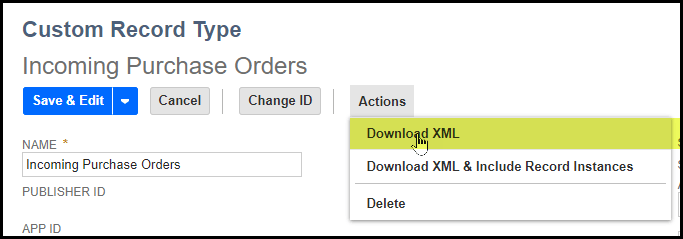
I’ll point out that if you are using SuiteCloud Developer Framework to move this custom record type from sandbox to production or vice versa, you also get the option of moving the data too. That’s handy!
Once you download the two object’s XML representations, you can use any “Diff” program to compare the two files side by side. In my case, I used the compare function in vsCode. WinMerge is another option. I’m sure there are lots of others.
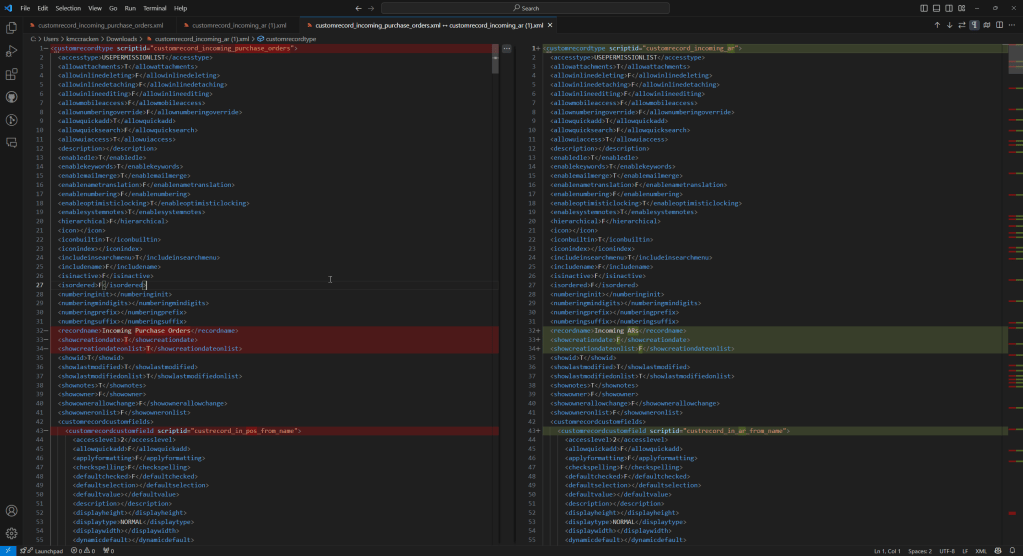
Visually, this makes it easy to see where you’ve missed something regarding your configuration settings, but also maintain the uniqueness of the script IDs.
 NetSuite Experiences