I thought I was clever, years ago when I hacked a way to create an Excel worksheet using SuiteScript. I never shared my work in this blog. Fast forward to today. I expected NetSuite would have a method for exporting an Excel worksheet incorporated into native SuiteScript. Unfortunately, this is still not true. But thanks to a very intelligent and energetic NetSuite Support Rep, Ehsan Salimi, I have an example to share.
The code below is written by Ehsan. It is 100% his work, and I take no credit and provide no warranty for it. Feel free to use it as an example, but at your own risk. It comes with no warranty (I have to say that!). After you review his code, I’ll share some thoughts on my version of the same from 3 years ago.
Here is Eshan’s example:
/**
 * @NApiVersion 2.x
 * @NScriptType ScheduledScript
 */
define(['N/search', 'N/file'], function (search, file) {

    /**
     * Base64 encode / decode
     * http://www.webtoolkit.info/
     */
    var Base64 = {
        // private property
        _keyStr: "ABCDEFGHIJKLMNOPQRSTUVWXYZabcdefghijklmnopqrstuvwxyz0123456789+/=",

        // public method for encoding
        encode: function (input) {
            var output = "";
            var chr1, chr2, chr3, enc1, enc2, enc3, enc4;
            var i = 0;

            input = Base64._utf8_encode(input);

            while (i < input.length) {
                chr1 = input.charCodeAt(i++);
                chr2 = input.charCodeAt(i++);
                chr3 = input.charCodeAt(i++);

                enc1 = chr1 >> 2;
                enc2 = ((chr1 & 3) << 4) | (chr2 >> 4);
                enc3 = ((chr2 & 15) << 2) | (chr3 >> 6);
                enc4 = chr3 & 63;

                if (isNaN(chr2)) {
                    enc3 = enc4 = 64;
                } else if (isNaN(chr3)) {
                    enc4 = 64;
                }

                output = output + this._keyStr.charAt(enc1) + this._keyStr.charAt(enc2) + this._keyStr.charAt(enc3) + this._keyStr.charAt(enc4);
            }

            return output;
        },

        // public method for decoding
        decode: function (input) {
            var output = "";
            var chr1, chr2, chr3;
            var enc1, enc2, enc3, enc4;
            var i = 0;

            input = input.replace(/[^A-Za-z0-9\+\/\=]/g, "");

            while (i < input.length) {
                enc1 = this._keyStr.indexOf(input.charAt(i++));
                enc2 = this._keyStr.indexOf(input.charAt(i++));
                enc3 = this._keyStr.indexOf(input.charAt(i++));
                enc4 = this._keyStr.indexOf(input.charAt(i++));

                chr1 = (enc1 << 2) | (enc2 >> 4);
                chr2 = ((enc2 & 15) << 4) | (enc3 >> 2);
                chr3 = ((enc3 & 3) << 6) | enc4;

                output = output + String.fromCharCode(chr1);

                if (enc3 != 64) {
                    output = output + String.fromCharCode(chr2);
                }
                if (enc4 != 64) {
                    output = output + String.fromCharCode(chr3);
                }
            }

            output = Base64._utf8_decode(output);
            return output;
        },

        // private method for UTF-8 encoding
        _utf8_encode: function (string) {
            string = string.replace(/\r\n/g, "\n");
            var utftext = "";

            for (var n = 0; n < string.length; n++) {
                var c = string.charCodeAt(n);

                if (c < 128) {
                    utftext += String.fromCharCode(c);
                } else if ((c > 127) && (c < 2048)) {
                    utftext += String.fromCharCode((c >> 6) | 192);
                    utftext += String.fromCharCode((c & 63) | 128);
                } else {
                    utftext += String.fromCharCode((c >> 12) | 224);
                    utftext += String.fromCharCode(((c >> 6) & 63) | 128);
                    utftext += String.fromCharCode((c & 63) | 128);
                }
            }

            return utftext;
        },

        // private method for UTF-8 decoding
        _utf8_decode: function (utftext) {
            var string = "";
            var i = 0;
            var c = c1 = c2 = 0;

            while (i < utftext.length) {
                c = utftext.charCodeAt(i);

                if (c < 128) {
                    string += String.fromCharCode(c);
                    i++;
                } else if ((c > 191) && (c < 224)) {
                    c2 = utftext.charCodeAt(i + 1);
                    string += String.fromCharCode(((c & 31) << 6) | (c2 & 63));
                    i += 2;
                } else {
                    c2 = utftext.charCodeAt(i + 1);
                    c3 = utftext.charCodeAt(i + 2);
                    string += String.fromCharCode(((c & 15) << 12) | ((c2 & 63) << 6) | (c3 & 63));
                    i += 3;
                }
            }

            return string;
        }
    };

    /**
     * Definition of the Scheduled script trigger point.
     *
     * @param {Object} scriptContext
     * @param {string} scriptContext.type - The context in which the script is executed. It is one of the values from the scriptContext.InvocationType enum.
     * @Since 2015.2
     */
    function execute(scriptContext) {
        var mySearch = search.load({
            id: 'customsearch1783'
        });

        var mySearchResultSet = mySearch.run();
        log.debug('Results...', mySearchResultSet);


        var xmlString = '';
        xmlString =
            '<?xml version="1.0" encoding="UTF-8"?>\n' +
            '<?mso-application progid="Excel.Sheet"?>\n' +
            '<Workbook xmlns="urn:schemas-microsoft-com:office:spreadsheet"\n' +
            ' xmlns:o="urn:schemas-microsoft-com:office:office"\n' +
            ' xmlns:x="urn:schemas-microsoft-com:office:excel"\n' +
            ' xmlns:ss="urn:schemas-microsoft-com:office:spreadsheet"\n' +
            ' xmlns:html="http://www.w3.org/TR/REC-html40">\n' +
            ' <DocumentProperties xmlns="urn:schemas-microsoft-com:office:office">\n' +
            '  <Author>SuiteScript</Author>\n' +
            '  <Created>' + new Date().toISOString() + '</Created>\n' +
            '  <Version>16.00</Version>\n' +
            ' </DocumentProperties>\n' +
            ' <Styles>\n' +
            '  <Style ss:ID="Default" ss:Name="Normal">\n' +
            '   <Alignment ss:Vertical="Bottom"/>\n' +
            '   <Font ss:FontName="Calibri" x:Family="Swiss" ss:Size="11" ss:Color="#000000"/>\n' +
            '  </Style>\n' +
            ' </Styles>\n' +
            ' <Worksheet ss:Name="Sheet1">\n' +
            '  <Table>\n' +
            '   <Row>\n' +
            '    <Cell><Data ss:Type="String">Internal id</Data></Cell>\n' +
            '    <Cell><Data ss:Type="String">Name</Data></Cell>\n' +
            '   </Row>\n';

            mySearchResultSet.each(function (resultObject) {
              var internalid = resultObject.getValue({
                  name: 'internalid'
              });
              log.debug('internal id', internalid);
              var name = resultObject.getText({
                  name: 'entity'
              });
              log.debug('name', name);

              xmlString += '   <Row>\n' +
              '    <Cell><Data ss:Type="String">' + internalid + '</Data></Cell>\n' +
              '    <Cell><Data ss:Type="String">' + name + '</Data></Cell>\n' +
              '   </Row>\n';

              return true;
            });


            xmlString += '  </Table>\n' +
            ' </Worksheet>\n' +
            '</Workbook>';

        // Encode XML string to Base64
        var base64String = Base64.encode(xmlString);

        var date = new Date();

        var fileObj = file.create({
            name: 'Saved Search Result - ' + date.toLocaleDateString() + '.xls',
            fileType: file.Type.EXCEL,
            contents: base64String,
            description: 'This is an XML-based Excel file.',
            folder: 877
        });

        var fileId = fileObj.save();
        log.debug('File ID...', fileId);
    }

    return {
        execute: execute
    };
});
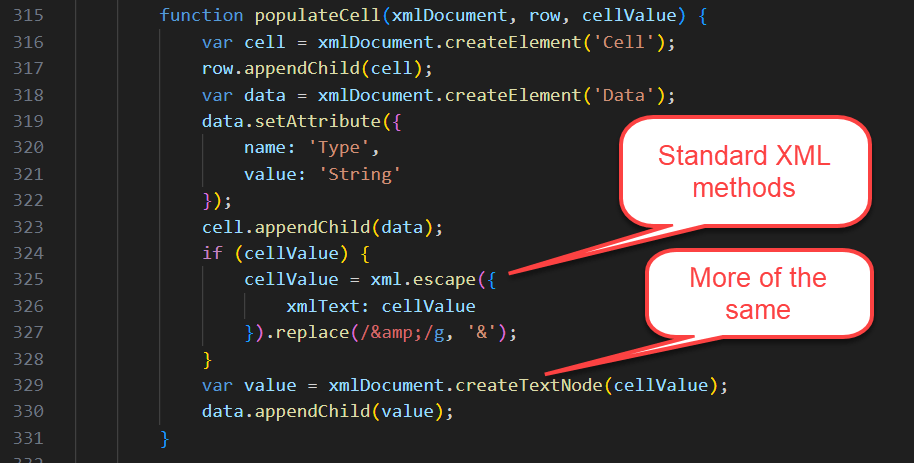
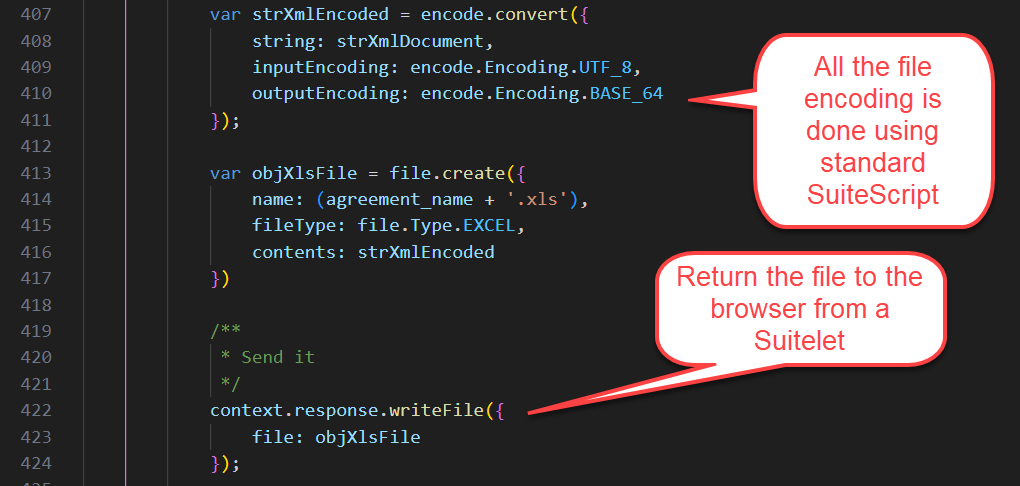
In my version, I used the ‘N/xml’ and ‘N/encode’ modules to replace some of the custom code supplied in Ehsan’s version.
Here, I’m showing that we used the same technique for starting a worksheet. We both copied the header from an existing Excel worksheet. You see it above in his variable named xmlString. In my case, I also copied the row with column headers, so my code only replaced data rows. I did that to also capture the formatting of the column header rows.
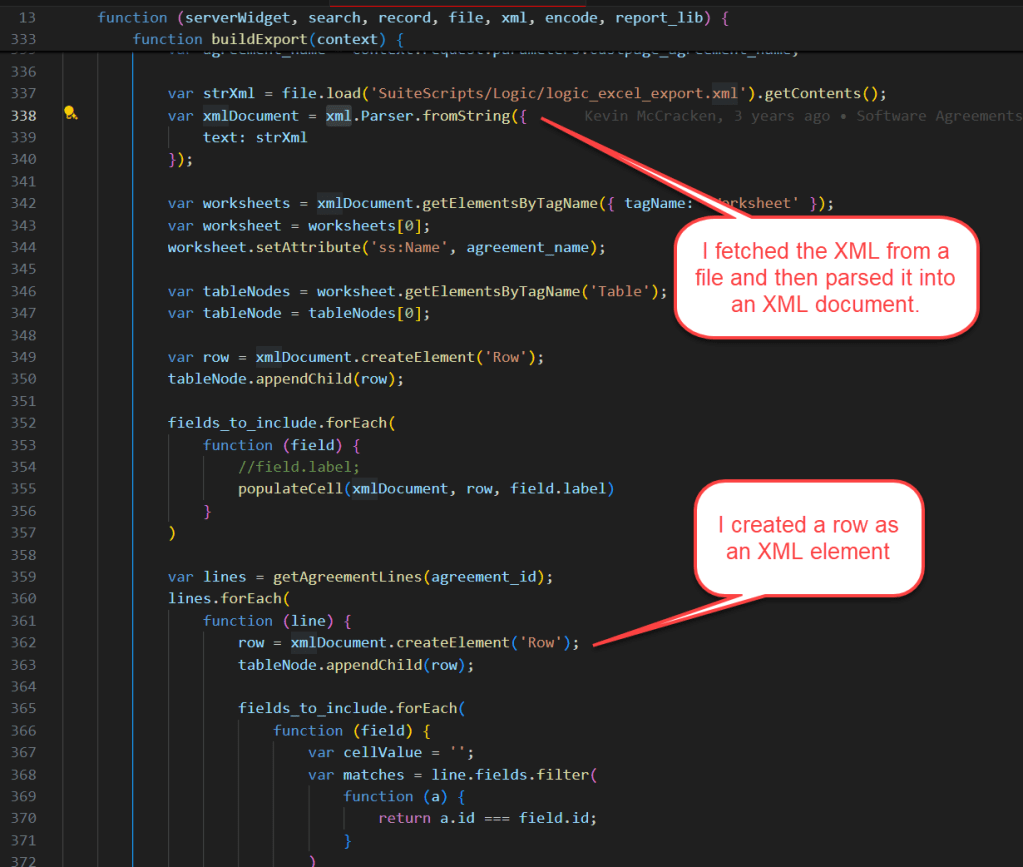
In my version, all XML elements were created and escaped using standard SuiteScript modules.
In my version, the file encoding is also done using standard SuiteScript.
I hope this saved you doing the research. As of April 2025, NetSuite does not offer a SuiteScript module that encodes Excel files natively. And if you still need this functionality, here is some help getting started.
 NetSuite Experiences