This month, I’m entering retirement. I’ve been writing software for over 4 decades and since 2017 it’s been almost exclusively spent customizing NetSuite. My time with NetSuite started out somewhat rocky. In fact my very first blog article was a scathing rebuke of the NetSuite platform and support. As I retire, I’d like to bookend with this. It is my pleasure to report good things about NetSuite.
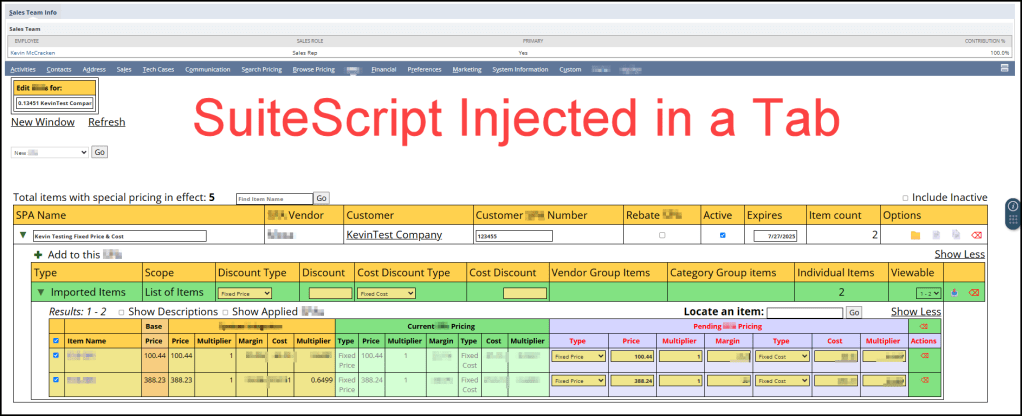
I find NetSuite incredibly extensible. As a developer, you are free to write your own single page apps, meaning you can inject custom pages anywhere in NetSuite. I like writing “modules” comprised of a Suitelet (the page), an HTML file for any statically defined markup, a Restlet (AKA restful API), often times I include a module-specific library, and finally a client script. This offers a clear separation of concerns. You can create your own data tables, custom record types. You can add custom fields to existing records. You can form your own relationships (parent-child) between all types of records. The sky is the limit!
I really like the selection of JavaScript for both server side and client side code. Over the years, the platform has progressed through SuiteScript 1.0, 2.0 and most recently 2.1. SuiteScript 2.1 is JavaScript ES6, which makes it closely compatible with the latest browser supported JavaScript. Many platform-specific methods are available on the server side and client-side. A call to search.lookupFields() works in a Suitelet, Restlet, or Client Script. A JavaScript method like Array.sort() works in server or client code. Unlike other platforms, where a developer might be writing C# on the server side and JavaScript on the client side, NetSuite reduces complexity by standardizing on one language and one set of platform-specific methods.
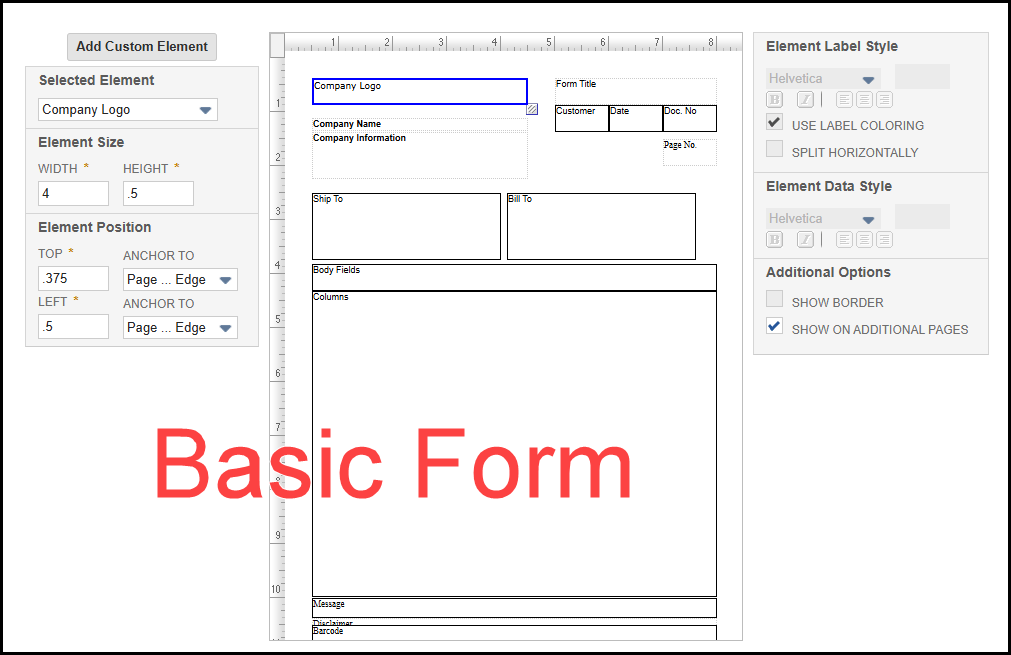
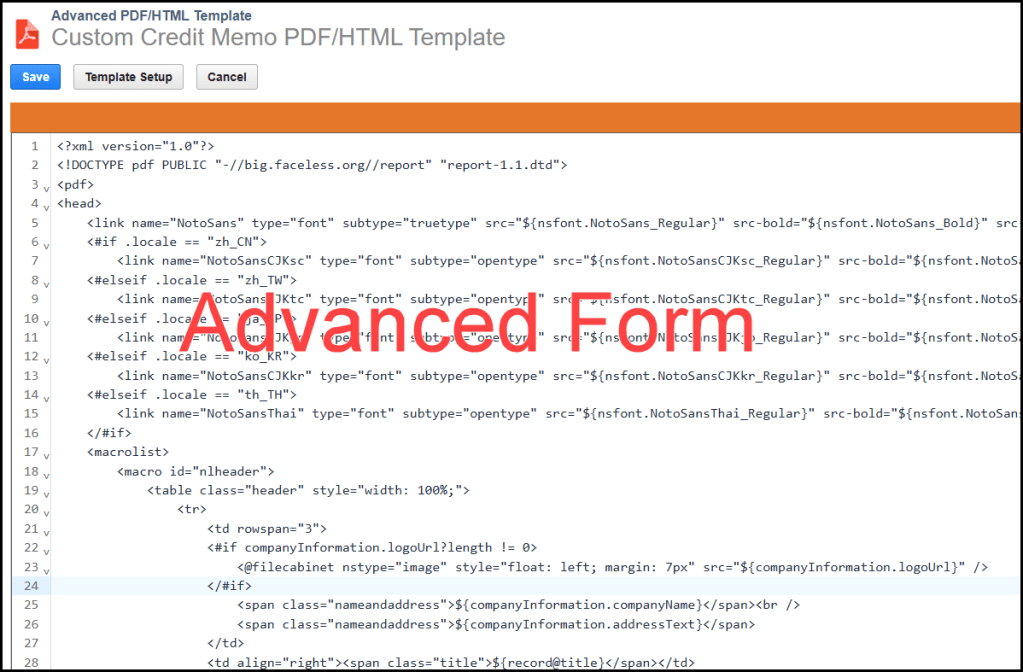
There are many standard reports, but you also have the option of writing saved searches, which can be printed much like a report. Printed transactions, like Estimates, Sales Orders, Invoices, Pick Tickets, Purchase orders, etc. can be customized in 2 ways. You have the option of using a non-developer basic form. Or you can have someone like me customize an Advanced HTML/PDF Template, which is a combination of HTML and Freemarker templating language.
NetSuite offers developers the option of creating background tasks, like Schedule Scripts. If a Scheduled Script becomes too needy and is monopolizing server-side resources, there’s the option of breaking it up into multiples tasks via a Map/Reduce Script.
A developer can inject custom code into a standard form, like viewing or editing a sales order. This is done through User Event Scripts and custom fields. Its even possible to commandeer a section of a standard form, like editing a sales order and injecting a single page app into a section of that form. Basically the sky’s the limit!
I’ve rambled on enough. In summary: I love working with NetSuite and I love writing JavaScript. And, I wanted to give NetSuite some love now that I’ve worked with it for over 8 years. To NetSuite’s credit, they’ve come a long way in a positive direction regarding both platform and support. If you are not a NetSuite customer, it’s worth a look!
I’ll also end with this shameless plug. I am retiring, but I’d kind of like to keep working with NetSuite. If you need any part time help, or want advice on a project, feel free to contact me. I updated the About page with more info about me. Hit the Contact page or comment on this post if you want to get in touch with me. I’ll still be around.
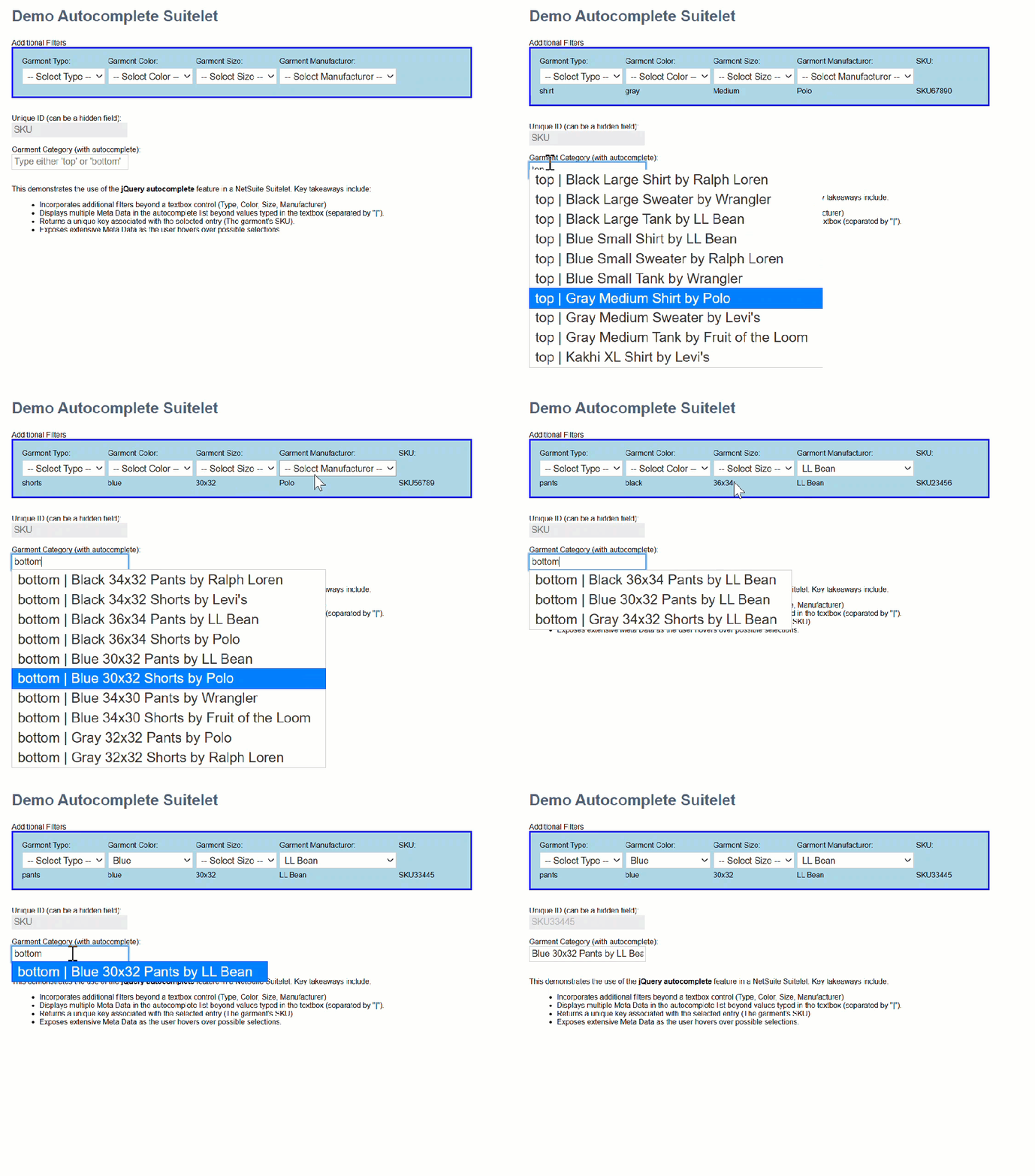
jQuery autocomplete is a powerful tool that can be overlooked or underutilized. Here is an example that demonstrates not only how jQuery autocomplete works, but some of its hidden potential.
In this example I demonstrate applying the contents of multiple HTML controls to filter results of a single textbox’s autocomplete results. Here is what it looks like in action.
My data is articles of clothing. A garment’s category only includes ‘tops’ and ‘bottoms’. It’s pretty sparse for an autocomplete example, but you get the idea.
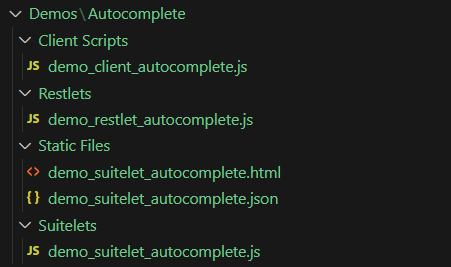
My example includes the following scripts: Suitelet, Restlet, Client, and an HTML file. The JSON file takes the place of a database. I created my JASONized data using vsCode’s Copilot. That’s a handy tip!
Here is the HTML file’s contents.
<label for="filters">Additional Filters</label><br />
<div id="filters" style="border: solid 2px blue; background-color: lightblue; padding: 10px; width: 40%;">
    <table>
        <tr>
            <td><label for="garment_type">Garment Type:</label></td>
            <td><label for="garment_color">Garment Color:</label></td>
            <td><label for="garment_size">Garment Size:</label></td>
            <td><label for="garment_manufacturer">Garment Manufacturer:</label></td>
            <td><label id="hover_sku_heading" style="display: none;">SKU:</label></td>
        </tr>
        <tr>
            <td><select id="garment_type" name="garment_type">
                    <option value="">-- Select Type --</option>
                    <option value="shirt">Shirt</option>
                    <option value="tank">Tank</option>
                    <option value="sweater">Sweater</option>
                    <option value="pants">Pants</option>
                    <option value="shorts">Shorts</option>
                </select></td>
            <td><select id="garment_color" name="garment_color">
                    <option value="">-- Select Color --</option>
                    <option value="blue">Blue</option>
                    <option value="gray">Gray</option>
                    <option value="black">Black</option>
                    <option value="kakhi">Kakhi</option>
                </select></td>
            <td><select id="garment_size" name="garment_size">
                    <option value="">-- Select Size --</option>
                    <option value="Small">Small</option>
                    <option value="Medium">Medium</option>
                    <option value="Large">Large</option>
                    <option value="XL">XL</option>
                    <option value="30x32">30x32</option>
                    <option value="32x32">32x32</option>
                    <option value="34x32">34x32</option>
                    <option value="36x32">36x32</option>
                    <option value="34x30">34x30</option>
                    <option value="36x34">36x34</option>
                </select>
            </td>
            <td><select id="garment_manufacturer" name="garment_manufacturer">
                    <option value="">-- Select Manufacturer --</option>
                    <option value="LL Bean">LL Bean</option>
                    <option value="Polo">Polo</option>
                    <option value="Ralph Loren">Ralph Loren</option>
                    <option value="Levi's">Levi's</option>
                    <option value="Wrangler">Wrangler</option>
                    <option value="Fruit of the Loom">Fruit of the Loom</option>
                </select>
            </td>
            <td></td>
        </tr>
        <tr>
            <td id="hover_type"></td>
            <td id="hover_color"></td>
            <td id="hover_size"></td>
            <td id="hover_manufacturer"></td>
            <td id="hover_sku"></td>
        </tr>
    </table>
</div><br />
<br />
<label for="garment_id">Unique ID (can be a hidden field):</label><br />
<input type="text" id="garment_id" name="garment_id" placeholder="SKU" disabled /><br />
<br />
<label for="garment_category">Garment Category (with autocomplete):</label><br />
<input type="text" id="garment_category" name="garment_category" placeholder="Type either 'top' or 'bottom'" /><br />
<br />
<p>
    This demonstrates the use of the <strong>jQuery autocomplete</strong> feature in a NetSuite Suitelet.
    Key takeaways include:
    <ul>
        <li>Incorporates additional filters beyond a textbox control (Type, Color, Size, Manufacturer)</li>
        <li>Displays multiple Meta Data in the autocomplete list beyond values typed in the textbox (separated by "|").</li>
        <li>Returns a unique key associated with the selected entry (The garment's SKU).</li>
        <li>Exposes extensive Meta Data as the user hovers over possible selections.</li>
    </ul>
</p>
Here is the client script’s contents.
/**
 * demo_client_autocomplete.js
* @NApiVersion 2.1
* @NScriptType ClientScript
*/

/*********************************************************************************
 *********************************************************************************
 FILE: demo_client_autocomplete.js
 *********************************************************************************
 *********************************************************************************/

//@ sourceURL=demo_client_autocomplete.js
define(['N/url', 'N/https'],
    (url, https) => {
        function pageInit(context) {
            $(document).ready(function () {

                let garment_id_field = $('input[name="garment_id"]');
                let garment_category_field = $('input[name="garment_category"]');

                restlet_base_url = url.resolveScript({
                    scriptId: 'customscript_demo_restlet_autocomplete',
                    deploymentId: 'customdeploy_demo_restlet_autocomplete',
                    returnExternalUrl: false
                });

                /**
                 * What's going on here is making functions available in the global scope.
                 * You can see that it also keeps them unique by exposing them inside a
                 * JavaScript namespace called demo_autocomplete_client.
                 */
                demo_autocomplete_client.restletGet = restletGet;
                demo_autocomplete_client.restletPost = restletPost;

                /**
                 * You turn on autocomplete via the autocomplete method associated with
                 * the input[type=text] control.
                 */
                garment_category_field.autocomplete({
                    source: function (request, response) {
                        let type = $('select[name="garment_type"]').val();
                        let color = $('select[name="garment_color"]').val();
                        let size = $('select[name="garment_size"]').val();
                        let manufacturer = $('select[name="garment_manufacturer"]').val();
                        /**
                         * In addition to typed text, you can send additional parameters to act as
                         * filters in the autocomplete responses.
                         */
                        restletGet(
                            'method=autocomplete' +
                            '&category=' + request.term + // <<<=== request term contains the typed text
                            '&type=' + type +
                            '&color=' + color +
                            '&size=' + size +
                            '&manufacturer=' + manufacturer
                            ,
                            function (data) {
                                response(JSON.parse(data));
                            }
                        );
                    },
                    minLength: 3,
                    /**
                     * This event fires on selection of one of the rows in the autocomplete list.
                     * Note the ui.item contains all properties you wish to send back.
                     *
                     * Properties that must be returned are Label and Value.
                     * Label: is what displays in the selectable list.
                     * Value: would typically represent an associated value.
                     */
                    select: function (event, ui) {
                        event.preventDefault();
                        garment_id_field.val(ui.item.value);
                        garment_category_field.val(ui.item.name);
                    },
                    /**
                     * This event fires whenever the user hovers over a possble selection.
                     */
                    focus: function (event, ui) {
                        $('#hover_size').text(ui.item.size);
                        $('#hover_color').text(ui.item.color);
                        $('#hover_type').text(ui.item.type);
                        $('#hover_manufacturer').text(ui.item.manufacturer);
                        $('#hover_sku_heading').show();
                        $('#hover_sku').text(ui.item.sku);
                        event.preventDefault();
                    },
                    close: function (event, ui) {
                        event.preventDefault();
                    },
                    change: function (event, ui) {
                        event.preventDefault();
                    }
                });

                $('input[name="garment_category"]').focus(
                    function () {
                        $('input[name="garment_category"]').val('');
                        $('input[name="garment_id"]').val('');
                    }
                )
            });
        }

        let restlet_base_url;

        function restletGet(parameters, callback) {
            return https.get.promise({
                url: restlet_base_url + '&' + parameters
            })
                .then(response => {
                    callback(response.body);
                })
                .catch(
                    reason => {
                        alert('error reason: ' + reason);
                    }
                )
        }

        function restletPost(parameters, callback) {
            return https.post.promise({
                url: restlet_base_url,
                body: parameters
            })
                .then(response => {
                    callback(response.body);
                })
                .catch(
                    reason => {
                        alert('Error: ' + reason);
                        callback('fail');
                    }
                )
        }

        return {
            pageInit: pageInit
        };
    }
);
var demo_autocomplete_client = {
    restletGet: () => { return false; }
    ,
    restletPost: () => { return false; }
}
I thought I was clever, years ago when I hacked a way to create an Excel worksheet using SuiteScript. I never shared my work in this blog. Fast forward to today. I expected NetSuite would have a method for exporting an Excel worksheet incorporated into native SuiteScript. Unfortunately, this is still not true. But thanks to a very intelligent and energetic NetSuite Support Rep, Ehsan Salimi, I have an example to share.
The code below is written by Ehsan. It is 100% his work, and I take no credit and provide no warranty for it. Feel free to use it as an example, but at your own risk. It comes with no warranty (I have to say that!). After you review his code, I’ll share some thoughts on my version of the same from 3 years ago.
Here is Eshan’s example:
/**
 * @NApiVersion 2.x
 * @NScriptType ScheduledScript
 */
define(['N/search', 'N/file'], function (search, file) {

    /**
     * Base64 encode / decode
     * http://www.webtoolkit.info/
     */
    var Base64 = {
        // private property
        _keyStr: "ABCDEFGHIJKLMNOPQRSTUVWXYZabcdefghijklmnopqrstuvwxyz0123456789+/=",

        // public method for encoding
        encode: function (input) {
            var output = "";
            var chr1, chr2, chr3, enc1, enc2, enc3, enc4;
            var i = 0;

            input = Base64._utf8_encode(input);

            while (i < input.length) {
                chr1 = input.charCodeAt(i++);
                chr2 = input.charCodeAt(i++);
                chr3 = input.charCodeAt(i++);

                enc1 = chr1 >> 2;
                enc2 = ((chr1 & 3) << 4) | (chr2 >> 4);
                enc3 = ((chr2 & 15) << 2) | (chr3 >> 6);
                enc4 = chr3 & 63;

                if (isNaN(chr2)) {
                    enc3 = enc4 = 64;
                } else if (isNaN(chr3)) {
                    enc4 = 64;
                }

                output = output + this._keyStr.charAt(enc1) + this._keyStr.charAt(enc2) + this._keyStr.charAt(enc3) + this._keyStr.charAt(enc4);
            }

            return output;
        },

        // public method for decoding
        decode: function (input) {
            var output = "";
            var chr1, chr2, chr3;
            var enc1, enc2, enc3, enc4;
            var i = 0;

            input = input.replace(/[^A-Za-z0-9\+\/\=]/g, "");

            while (i < input.length) {
                enc1 = this._keyStr.indexOf(input.charAt(i++));
                enc2 = this._keyStr.indexOf(input.charAt(i++));
                enc3 = this._keyStr.indexOf(input.charAt(i++));
                enc4 = this._keyStr.indexOf(input.charAt(i++));

                chr1 = (enc1 << 2) | (enc2 >> 4);
                chr2 = ((enc2 & 15) << 4) | (enc3 >> 2);
                chr3 = ((enc3 & 3) << 6) | enc4;

                output = output + String.fromCharCode(chr1);

                if (enc3 != 64) {
                    output = output + String.fromCharCode(chr2);
                }
                if (enc4 != 64) {
                    output = output + String.fromCharCode(chr3);
                }
            }

            output = Base64._utf8_decode(output);
            return output;
        },

        // private method for UTF-8 encoding
        _utf8_encode: function (string) {
            string = string.replace(/\r\n/g, "\n");
            var utftext = "";

            for (var n = 0; n < string.length; n++) {
                var c = string.charCodeAt(n);

                if (c < 128) {
                    utftext += String.fromCharCode(c);
                } else if ((c > 127) && (c < 2048)) {
                    utftext += String.fromCharCode((c >> 6) | 192);
                    utftext += String.fromCharCode((c & 63) | 128);
                } else {
                    utftext += String.fromCharCode((c >> 12) | 224);
                    utftext += String.fromCharCode(((c >> 6) & 63) | 128);
                    utftext += String.fromCharCode((c & 63) | 128);
                }
            }

            return utftext;
        },

        // private method for UTF-8 decoding
        _utf8_decode: function (utftext) {
            var string = "";
            var i = 0;
            var c = c1 = c2 = 0;

            while (i < utftext.length) {
                c = utftext.charCodeAt(i);

                if (c < 128) {
                    string += String.fromCharCode(c);
                    i++;
                } else if ((c > 191) && (c < 224)) {
                    c2 = utftext.charCodeAt(i + 1);
                    string += String.fromCharCode(((c & 31) << 6) | (c2 & 63));
                    i += 2;
                } else {
                    c2 = utftext.charCodeAt(i + 1);
                    c3 = utftext.charCodeAt(i + 2);
                    string += String.fromCharCode(((c & 15) << 12) | ((c2 & 63) << 6) | (c3 & 63));
                    i += 3;
                }
            }

            return string;
        }
    };

    /**
     * Definition of the Scheduled script trigger point.
     *
     * @param {Object} scriptContext
     * @param {string} scriptContext.type - The context in which the script is executed. It is one of the values from the scriptContext.InvocationType enum.
     * @Since 2015.2
     */
    function execute(scriptContext) {
        var mySearch = search.load({
            id: 'customsearch1783'
        });

        var mySearchResultSet = mySearch.run();
        log.debug('Results...', mySearchResultSet);


        var xmlString = '';
        xmlString =
            '<?xml version="1.0" encoding="UTF-8"?>\n' +
            '<?mso-application progid="Excel.Sheet"?>\n' +
            '<Workbook xmlns="urn:schemas-microsoft-com:office:spreadsheet"\n' +
            ' xmlns:o="urn:schemas-microsoft-com:office:office"\n' +
            ' xmlns:x="urn:schemas-microsoft-com:office:excel"\n' +
            ' xmlns:ss="urn:schemas-microsoft-com:office:spreadsheet"\n' +
            ' xmlns:html="http://www.w3.org/TR/REC-html40">\n' +
            ' <DocumentProperties xmlns="urn:schemas-microsoft-com:office:office">\n' +
            '  <Author>SuiteScript</Author>\n' +
            '  <Created>' + new Date().toISOString() + '</Created>\n' +
            '  <Version>16.00</Version>\n' +
            ' </DocumentProperties>\n' +
            ' <Styles>\n' +
            '  <Style ss:ID="Default" ss:Name="Normal">\n' +
            '   <Alignment ss:Vertical="Bottom"/>\n' +
            '   <Font ss:FontName="Calibri" x:Family="Swiss" ss:Size="11" ss:Color="#000000"/>\n' +
            '  </Style>\n' +
            ' </Styles>\n' +
            ' <Worksheet ss:Name="Sheet1">\n' +
            '  <Table>\n' +
            '   <Row>\n' +
            '    <Cell><Data ss:Type="String">Internal id</Data></Cell>\n' +
            '    <Cell><Data ss:Type="String">Name</Data></Cell>\n' +
            '   </Row>\n';

            mySearchResultSet.each(function (resultObject) {
              var internalid = resultObject.getValue({
                  name: 'internalid'
              });
              log.debug('internal id', internalid);
              var name = resultObject.getText({
                  name: 'entity'
              });
              log.debug('name', name);

              xmlString += '   <Row>\n' +
              '    <Cell><Data ss:Type="String">' + internalid + '</Data></Cell>\n' +
              '    <Cell><Data ss:Type="String">' + name + '</Data></Cell>\n' +
              '   </Row>\n';

              return true;
            });


            xmlString += '  </Table>\n' +
            ' </Worksheet>\n' +
            '</Workbook>';

        // Encode XML string to Base64
        var base64String = Base64.encode(xmlString);

        var date = new Date();

        var fileObj = file.create({
            name: 'Saved Search Result - ' + date.toLocaleDateString() + '.xls',
            fileType: file.Type.EXCEL,
            contents: base64String,
            description: 'This is an XML-based Excel file.',
            folder: 877
        });

        var fileId = fileObj.save();
        log.debug('File ID...', fileId);
    }

    return {
        execute: execute
    };
});
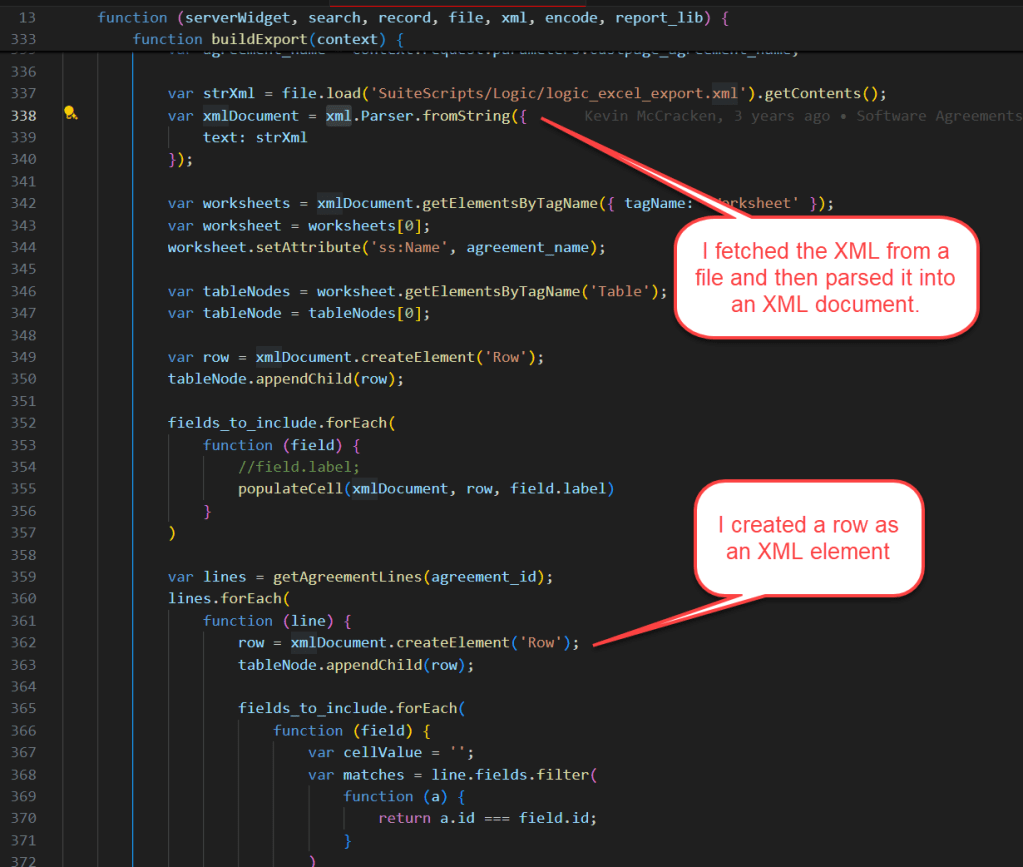
In my version, I used the ‘N/xml’ and ‘N/encode’ modules to replace some of the custom code supplied in Ehsan’s version.
Here, I’m showing that we used the same technique for starting a worksheet. We both copied the header from an existing Excel worksheet. You see it above in his variable named xmlString. In my case, I also copied the row with column headers, so my code only replaced data rows. I did that to also capture the formatting of the column header rows.
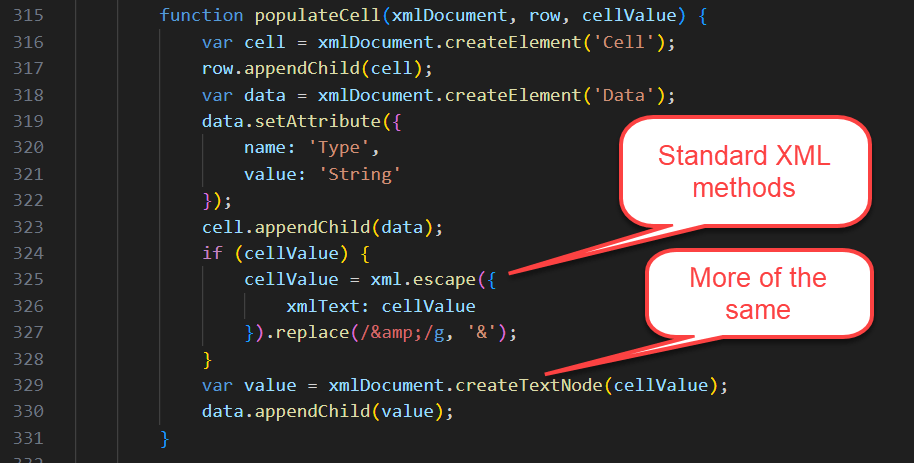
In my version, all XML elements were created and escaped using standard SuiteScript modules.
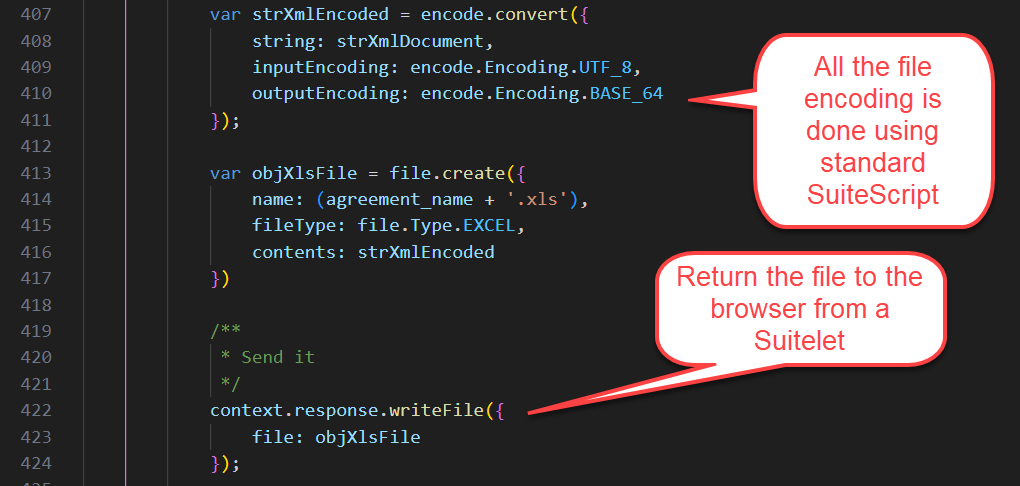
In my version, the file encoding is also done using standard SuiteScript.
I hope this saved you doing the research. As of April 2025, NetSuite does not offer a SuiteScript module that encodes Excel files natively. And if you still need this functionality, here is some help getting started.
Release 2024.1 introduced a problem with printed invoices. Suddenly, part numbers were replaced with each item’s internal ID. At first glance I thought this a bad thing, but not so fast.
A field that we’d printed in advanced templates since 2017, displayname, suddenly morphed into an item’s internal ID. Clearly this was not our doing, but something in release 2024.1 had changed. Long story short, I suspect NetSuite is exposing more joined records in advanced templates. After contacting NetSuite, they provided a workaround where I’m swapping item.displayname for item.item.displayname.
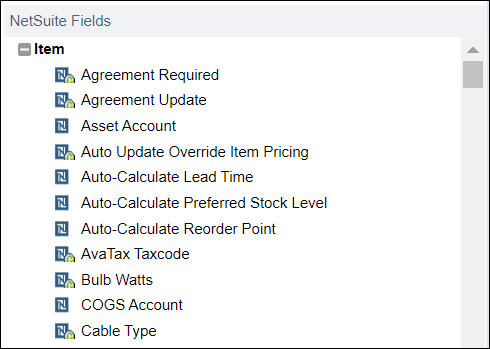
I’ve previously written about how to find fields in advanced templates, but I’ll remind myself (and you) where to check what’s available in your Freemarker templates.
Start by opening your advanced template. It opens in Edit view. You’re looking at Freemarker/HTML code.
Toggle the source code button back to the WYSIWYG view. You won’t keep this view permanently, but here is where you get your list of available joins and fields.
Then click the plus button.
At the bottom of the list are all your joined records.
Expand those to see joins and fields. In my case, I needed record.item.item.
I guess it’s possible item.item.displayname has been there all along and I missed it. My wife tells me she could rearrange the furniture in our entire home and it would take me weeks to notice. Dunno!
This was confusing and cost me a lot of time. A field must be editable and present on the form associated with your CSV import.
If you wish to make a custom field visible to users, but protect against modifications, you can change the display type. Your options are shown below.
If you select any option besides “Normal” you are effectively locking your custom field from UI initiated modifications. Normal is the default.
When you add your custom field to various forms, it propagates that setting. The setting can be modified later, but changing the setting in the definition of the custom field will not change it in the forms. you must actively change it when you reapply to forms.
During your CSV import, you can pick a form. The field must be included in the form and have a display type of “Normal” in order to update using CSV.
With your custom field present and modifiable on the form, it will show up in the list below.
Who would have ever thought the “Display Type” would affect CSV imports? Crazy!
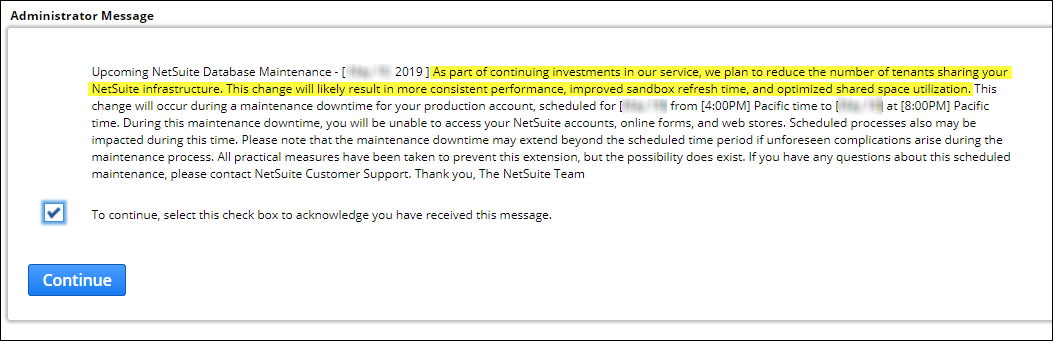
I can’t tell you how good it was to see a notice pop up when logging into NetSuite telling me we were going to experience some down time. NetSuite was planning to reduce the number of tenants per shared host in an effort to decrease variability of response times. AWESOME! I’d been pestering them about this for several months.
In previous blog posts, I had drawn several conclusions:
NetSuite customers share a common host (this was a no-brainer)
NetSuite was NOT automatically rearranging tenants to find companies that fit nicely together on the same host.
Oracle was pouring money into NetSuite to solve the problem of poor or erratic performance.
NetSuite/Oracle was working hard to make it easier to migrate tenants to either a new host or a new data center (and new database architecture)
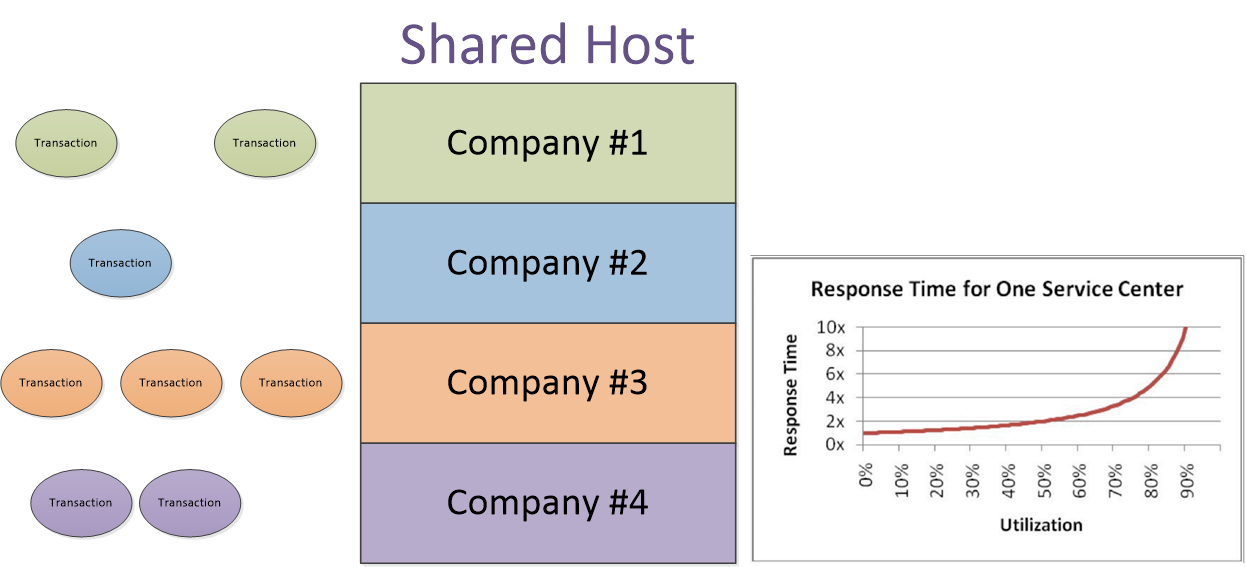
Here’s what NetSuite/Oracle is fixing. In a multi-tenant environment, different companies all run transactions concurrently. It looks something like this, where each company/customer has transactions arriving at various intervals.
If every transaction arrived at the shared host when it was completely idle, response time would be whatever time it took for the server and database to complete that transaction. But if the shared host is busy when a transaction arrives (and the shared host can’t get to it), it waits for its turn to execute.
The trick is finding the right mix of tenants, possibly companies in different time zones (separated by more than a few hours), to share a host. However, the next problem is the idea of regional data centers. Is it practical to have a company in Ireland sharing a host with a company in California? This would be a great mix. But will the company in Ireland be happy having their NetSuite provision hosted somewhere in the US, or vice versa? Probably not.
So the trick is finding good matches as shared tenants. It appears NetSuite is evaluating this problem and making some strategic Chess moves. I received this notice recently when I logged in.
If you read some of my other blog posts, you’ll see how I was able to diagnose that at least two-thirds of my transactions ran reasonably quickly. One-third didn’t. When I dissected the response times of the poor performers, it was elongated server time (not workflows, and not SuiteScripts) that was causing the problem. It was my conclusion that it was wait times caused by a busy host that was the problem.
So this notice of downtime was truly a sight for sore eyes! I’ve said this before, but it’s worth repeating… Thank you, Mark Hurd (President of Oracle). It appears you are spending your money wisely.




 NetSuite Experiences